A chart can give you an entry idea while leaving the order itself unfinished. The quantity may be too large for the planned stop, the margin mode may still be on its default setting, or funding may settle before you expect to close. A pre-trade checklist for perpetual futures puts those decisions on paper before they become an open position.
Build it around the checks below, then keep a completed copy with each trade record.
1. Confirm the contract and settlement currency
Perpetual futures have no scheduled expiry. A position therefore needs an exit plan, even when there is no delivery date to consider.
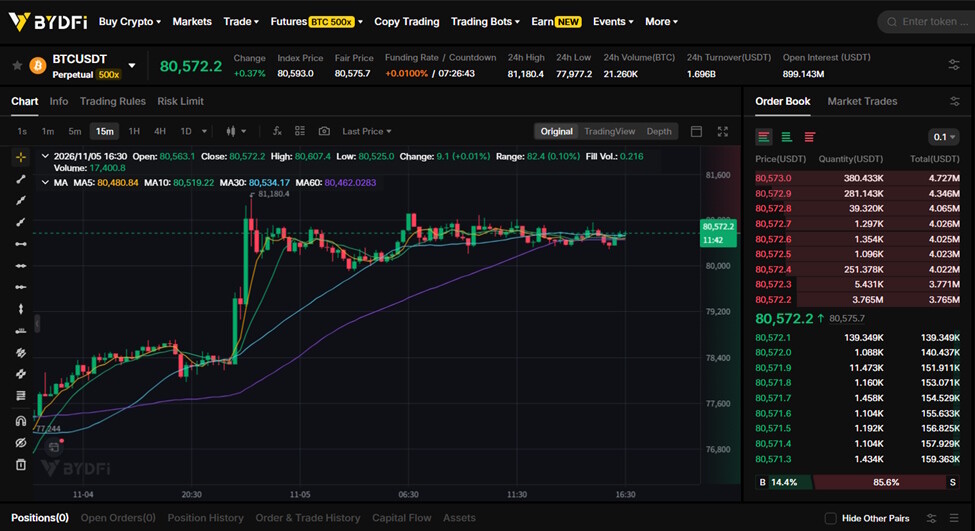
Start by recording the exact market, settlement currency and order unit. A quantity field may represent coins or contracts; confirm its meaning before entering a number. When reviewing BYDFi perpetual futures, check the selected contract and its specifications before working through the order settings. The linked market is BTC/USDT, so your notes should identify that market rather than simply say “Bitcoin.”
2. Define the entry and both exits
Learning how to trade crypto futures starts with describing the trade clearly enough to review it. Write down the intended direction, entry condition, level that invalidates the idea and profit target. If the market never meets the entry condition, the plan remains unfilled.
Consider a hypothetical long position in a linear BTC contract settled in USDT. Assume an entry at 100,000 USDT, a stop at 99,000 and a target at 102,000. These are illustrative prices, not a market forecast.
The planned loss distance is 1,000 USDT per BTC; the target distance is 2,000. Expressed as risk to reward, the risk reward ratio is 1:2 before costs. If your written strategy requires that ratio after costs, this setup needs reassessment once fees and funding are included. The ratio alone says nothing about the probability of reaching the target.
3. Calculate position size from the stop
CME Group’s position-sizing guidance starts with the stop location and the amount the trader is prepared to risk. Use those inputs before choosing leverage.
For the hypothetical linear contract above, suppose the allowance for price-movement loss is 50 USDT. With quantity expressed in BTC, the calculation is:
Position size = 50 USDT ÷ 1,000 USDT per BTC = 0.05 BTC.
At that size, a fill at the planned stop would produce a 50 USDT price loss. A fill at the target would produce a 100 USDT price gain. Both exclude fees, funding and slippage. If 50 USDT is your total loss budget, reserve room for costs before sizing the position; a stop cannot guarantee that the eventual loss stays within that budget.
A crypto position size calculator should use the same entry, stop, units and contract model as your plan. This example assumes linear price-based P&L and cannot be transferred unchanged to an inverse contract. Check quantity increments and round down where needed. Keep the stop tied to the trade’s invalidation point instead of moving it merely to accommodate a larger position.
4. Compare cross margin vs isolated margin
Margin mode determines which funds support the position. Under BYDFi’s cross-margin mode, available funds in the relevant margin account support open positions together. Isolated margin allocates margin to a specific position. Adding margin later changes the amount committed, so record any manual or automatic margin additions you permit.
Confirm the intended mode explicitly, then record leverage and review the displayed liquidation estimate. Margin posted to open a position and the planned loss at a stop are different figures. Calculate each separately, and review whether liquidation could occur before the intended exit under the contract’s rules.
5. What is funding rate in crypto?
Funding is a payment between long and short holders that helps keep perpetual contract prices near the underlying spot market. On BYDFi, a positive rate means longs pay shorts; a negative rate reverses that direction. BYDFi takes no share of the payment.
Write down the displayed rate, next settlement time and whether your position would pay or receive. A position held through settlement may incur funding even if its price has barely moved. Check the contract’s current schedule against your intended holding period, and avoid projecting one displayed rate unchanged across a longer trade.
Keep funding separate from trading fees when estimating the cost of the position.
6. Stop loss crypto checks and trading fees
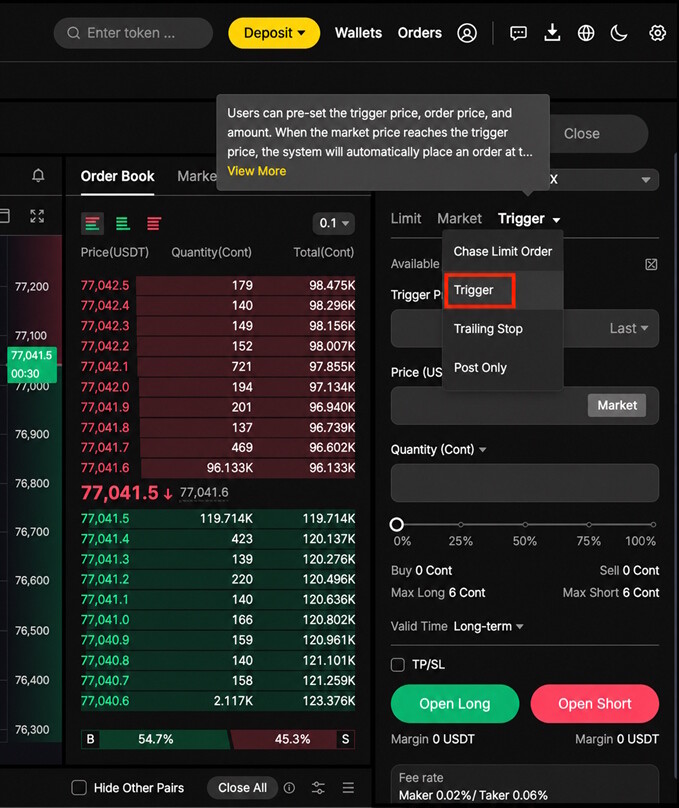
Record the stop’s trigger price, trigger reference, order type and closing quantity. BYDFi Trigger Orders support Last Price, Fair Price and Index Price references. Confirm which one you selected: the chart price you are watching may use a different reference.
A triggered market order can fill away from the intended price. A limit order controls the acceptable execution price but may remain unfilled. Check that the chosen exit settings match the position you intend to close.
BYDFi’s public fee page displayed base futures rates of 0.02% maker and 0.06% taker on November 5, 2026. In a separate hypothetical example, a 1,000 USDT fill at those rates costs 0.20 USDT as maker or 0.60 USDT as taker. These are fees for one fill, not an entire round trip. Estimate entry and exit separately using their expected fill values and applicable account rates. A limit order that matches immediately can incur a taker fee.
7. Keep a reusable checklist for futures trading strategies
Review the following items before each trade:
- Contract, settlement currency and quantity unit.
- Direction, entry condition and reason for the trade.
- Invalidation level, stop settings and target.
- Loss allowance, position size and calculation.
- Risk-to-reward comparison after estimated costs.
- Margin mode, leverage, allocated funds and liquidation estimate.
- Funding rate, payment direction and next settlement.
- Entry and exit order types, quantities and estimated fees.
Compare the completed record with the order screen before submitting. If an item is unresolved or the settings differ, pause and correct the plan. After the position closes, add the actual fills, fees and funding to the same record so the next review can compare what you planned with what happened.